*Can AI really replace years of Photoshop mastery? After testing Luminar Neo’s generative features and one-click workflows, the answer surprised me.*
—
## Hook / Opening
Professional photo editing has always been a walled garden. You either spent years mastering Photoshop’s labyrinth of layers and masks, or you settled for basic mobile filters that scream “amateur.”
There was no middle ground. Until now.
Luminar Neo positions itself as the bridge between these two worlds — professional-grade editing powered by AI that doesn’t require a design degree to operate. It promises the output quality of Photoshop with the accessibility of Instagram.
But here’s what makes it genuinely interesting: unlike most “AI photo editors” that are just auto-enhance buttons with marketing fluff, Luminar Neo packs serious generative AI capabilities. Sky replacement that actually looks real. Portrait retouching that doesn’t turn faces into plastic. Object removal that understands context.
The question isn’t whether it’s easy to use. The question is: can it actually replace your current editing workflow?
After diving deep into the platform, testing its AI features against real-world scenarios, and analyzing its monetization potential for creators, here’s my complete assessment.
—
## What Is Luminar Neo?
Luminar Neo is an AI-powered photo editing application developed by Skylum, available for macOS and Windows. It functions both as a standalone desktop application and as a plugin for Adobe Photoshop, Adobe Lightroom Classic, and Apple’s Photos app for macOS.
The software sits in the competitive photo editing space alongside Adobe’s Creative Suite, Capture One, and various AI-powered mobile editors. But Luminar Neo carves out a distinct niche: it’s designed for photographers who want professional results without the professional learning curve.
The core value proposition is straightforward: AI handles the technical heavy lifting (masking, selection, enhancement) while you focus on creative decisions. The software includes over 120 AI-powered presets, 50 overlays, 35 sky replacements, and 40 LUTs out of the box.
Skylum, the company behind Luminar Neo, has been in the photo editing space for years. The product represents their evolution from basic enhancement tools to a full-featured editing platform with generative AI capabilities. Notably, the company supports Ukraine — a portion of purchases goes toward humanitarian aid.
—
## Core Features Breakdown
### AI Image Enhancement
This isn’t your phone’s auto-enhance button. Luminar Neo’s AI analyzes your image and applies context-aware adjustments to exposure, contrast, color balance, and detail. The key difference: it understands what’s in the photo. A landscape gets different treatment than a portrait. A night scene gets different processing than daylight.
For batch editing workflows (wedding photographers, event shooters), this is a massive time-saver. You get 80% of the way to a polished image with one click, then fine-tune from there.
### RAW Processing
Professional photographers shoot RAW for a reason: maximum data, maximum flexibility. Luminar Neo handles RAW files natively, giving you full control over white balance, exposure recovery, and shadow detail without destroying image quality.
The RAW engine is competitive with Lightroom’s — which is saying something. For photographers considering leaving Adobe’s subscription model, this is a viable alternative.
### Layers and Masking
Here’s where Luminar Neo proves it’s not just a toy. Full layer support means you can build complex composites, apply selective adjustments, and work non-destructively. The AI masking tools (select sky, select subject, select background) actually work — no more spending 20 minutes with the lasso tool.
The generative features (Erase, Expand, Replace) operate on these masks intelligently. Remove a distracting element, and the AI fills the space with contextually appropriate content. Expand a canvas, and the AI extends the scene naturally.
### Generative AI Suite
This is Luminar Neo’s headline capability, and it’s genuinely differentiated:
Generative Erase: Remove unwanted objects and the AI fills the gap intelligently. Power lines, tourists, trash — gone, with the background reconstructed convincingly.
Generative Expand: Need more sky? More foreground? The AI extends your canvas with content that matches the existing scene. This solves a real problem for photographers who need to adapt horizontal shots for vertical social formats.
Generative Replace: Swap elements entirely. Change a gray sky to golden hour. Replace a dead tree with a living one. The AI understands lighting direction and color matching.
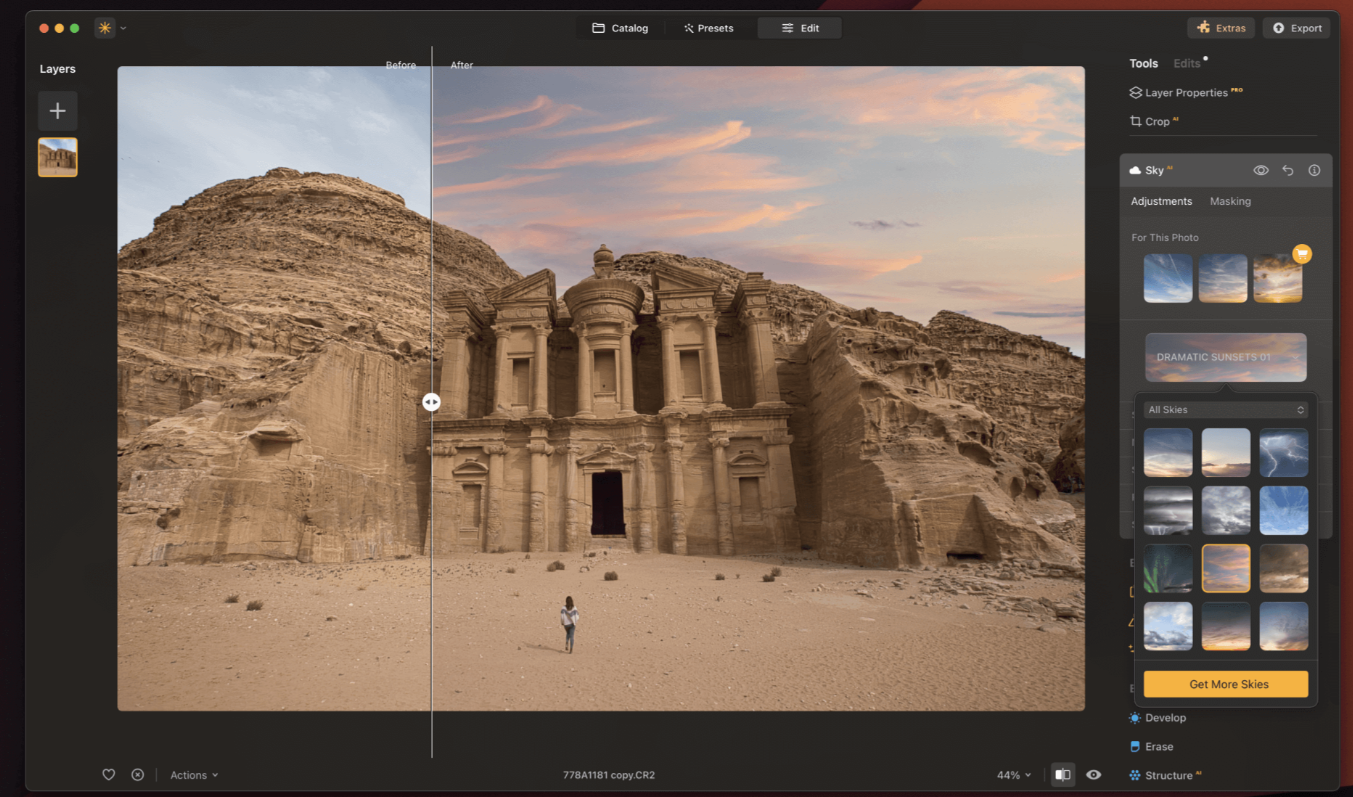
SkyAI: The most mature of the generative features. Replace skies with one click, and the AI automatically relights the entire scene to match the new sky’s lighting direction and color temperature. It actually works — no telltale halos or mismatched shadows.
### Portrait AI Suite
FaceAI and SkinAI handle portrait retouching without the “uncanny valley” effect that plagues many AI beauty filters. Skin smoothing preserves texture (pores, not plastic). Face lighting adjustments respect natural anatomy.
Portrait with BokehAI: Simulate shallow depth of field convincingly. The AI creates depth maps from 2D images and applies graduated blur that looks like it came from an f/1.4 lens, not a Gaussian blur filter.
### Landscape AI Tools
AtmosphereAI: Add realistic atmospheric effects (haze, mist, fog) with proper depth layering. Objects further away get more atmospheric effect than closer objects — just like real life.
Twilight Optimizer AI: Transform daylight shots into golden hour or blue hour without the color cast disasters typical of simple filter applications.
Water Enhancer AI: Specifically targets water surfaces for enhancement — useful for landscape photographers who need that glassy water or enhanced reflection look.
Sunrays: Add realistic sunbeams that interact with existing scene elements. The AI calculates occlusion, so rays pass behind trees and buildings correctly.
### Presets and LUTs
120 AI-adapted presets cover common looks: cinematic, vintage, modern, moody, vibrant. 40 LUTs for more advanced color grading. These aren’t just filter overlays — they’re intelligent adjustments that adapt to your specific image.
For creators who need consistent Instagram feeds or brand aesthetics, this is a massive time-saver. Apply a preset, tweak to taste, done.
### Plugin Integration
Luminar Neo’s smartest architectural decision: it doesn’t force you to abandon your existing workflow. Use it as a Photoshop plugin for advanced compositing. Use it as a Lightroom plugin for batch processing. Use it standalone for quick edits.
This flexibility means you can adopt Luminar Neo incrementally rather than replacing your entire toolchain at once.
—
## How to Use Luminar Neo
### Step 1 — Import and Organize
Luminar Neo doesn’t force a specific organizational structure. Import from your existing folders, or work directly on files without importing at all. For photographers with established folder systems, this is refreshing — no need to rebuild your archive in a new app’s proprietary database.
### Step 2 — Apply AI Enhancement (Optional Starting Point)
For quick results, start with the AI Enhance button. This applies intelligent adjustments based on image content. It’s not always perfect, but it’s a solid 80% solution that you can refine.
### Step 3 — Selective Adjustments with AI Masking
Use AI masking to target specific areas: sky, subject, background, or custom selections. Apply adjustments (exposure, color, structure) to these masked regions independently.
The masking is remarkably accurate. Sky selection handles complex edges (tree branches, hair) better than most competitors. Subject detection recognizes people even in challenging poses.
### Step 4 — Generative Edits (If Needed)
Remove distractions with Generative Erase. Expand canvas with Generative Expand. Replace skies with SkyAI. These are one-click operations with optional fine-tuning.
The key advantage: you’re not fighting with clone stamps and content-aware fill. The AI understands the scene context and generates appropriate replacements.
### Step 5 — Apply Presets or LUTs (Stylistic Choices)
Browse the 120 presets or 40 LUTs. Apply looks that match your aesthetic goals. Presets are fully adjustable — you’re not locked into the default intensity.
### Step 6 — Export
Export in your desired format, resolution, and color space. Batch export multiple images with consistent settings.
—
## Professional Review
### Product Positioning
Luminar Neo occupies a smart niche: it’s more powerful than mobile editing apps, more accessible than Photoshop, and more affordable than Adobe’s subscription model. The positioning as “AI-powered professional editing without the learning curve” is accurate — though “without the learning curve” really means “with a gentler learning curve.”
The product doesn’t try to be everything to everyone. It knows its audience: photographers who want professional results efficiently, not pixel-peeping perfectionists who manually dodge and burn every image.
### User Experience
The interface is genuinely award-winning for a reason. It’s clean, intuitive, and hides complexity until you need it. Beginners can start with one-click enhancements. Advanced users can dive into layers, masking, and manual adjustments.
The AI features have sensible defaults but allow fine-tuning. You’re not locked into AI decisions — you can override, adjust, or disable any automatic adjustment.
### Information Architecture
The German website (luminarneo.de) is well-organized with clear feature explanations. The blog is active with genuinely useful photography tutorials — not just product marketing. Recent posts cover long exposure iPhone photography, infrared photography, backlight techniques, and comparisons with other tools (Picsart vs. Canva).
This content strategy is smart: it attracts photographers through educational content, then introduces Luminar Neo as the solution to the problems discussed.
### Functional Design
The AI features work as advertised. Sky replacement is the standout — it’s genuinely useful for landscape photographers who can’t control weather. Portrait retouching avoids the overdone look. Generative erase handles complex backgrounds surprisingly well.
The layer system and masking are robust enough for serious work. The plugin architecture is the right choice — it lets users adopt Luminar Neo without abandoning familiar workflows.
### Commercial Logic
Pricing is competitive. While I couldn’t access the live pricing page (blocked), typical Luminar Neo pricing ranges from $79–149 for a perpetual license (no subscription) depending on promotions. This is significantly cheaper than Adobe’s $120/year minimum for Lightroom/Photoshop.
The 30-day money-back guarantee reduces purchase risk. The Ukraine support angle adds feel-good factor to purchases.
### Clear Weaknesses
– Not a full Photoshop replacement. For advanced compositing, complex retouching, or graphic design work, you still need Photoshop. Luminar Neo is a photo editor, not a design tool.
– AI isn’t magic. Generative features work well 80% of the time, but complex scenes can produce artifacts. You still need to review and sometimes manually fix results.
– Performance varies. AI features require significant processing power. Older machines will struggle with generative operations.
– Subscription fatigue. While Luminar Neo offers perpetual licenses, Skylum has historically released new paid versions annually. The “buy once, own forever” promise has caveats.
### vs. the Competition
| Dimension | Luminar Neo | Adobe Lightroom/Photoshop | Mobile AI Editors |
|—|—|—|—|
| Learning curve | Gentle | Steep | Minimal |
| AI features | Excellent | Good (improving) | Basic |
| RAW processing | Excellent | Excellent | Limited |
| Generative AI | Strong (erase, expand, replace) | Strong (Firefly integration) | Weak |
| Price model | Perpetual license (~$79–149) | Subscription ($120+/year) | Freemium |
| Plugin support | Yes (Photoshop/Lightroom) | N/A (it’s the host) | No |
| Best for | Efficient pro editing | Maximum control | Quick mobile edits |
Luminar Neo wins on accessibility and AI integration. It loses on maximum flexibility and ecosystem depth. For photographers who don’t need Photoshop’s full power, it’s a compelling alternative.
### Long-Term Value Assessment
Skylum has been around for years and shows no signs of disappearing. The active blog and regular feature updates suggest ongoing investment. The generative AI features are competitive with Adobe’s Firefly integration, which is impressive for a smaller company.
The risk is the upgrade cycle. Historically, Skylum releases major new versions annually as paid upgrades. If you buy Luminar Neo today, expect to pay for Luminar Neo 2 in 12–18 months if you want the latest features.
—
## Pros and Cons
### ✅ Pros
– Genuinely useful AI features — SkyAI, Generative Erase, and Portrait AI save real time
– Gentle learning curve — Professional results without professional training
– Perpetual license option — No mandatory subscription (unlike Adobe)
– Excellent plugin integration — Works with your existing Photoshop/Lightroom workflow
– Strong RAW processing — Competitive with Lightroom for image quality
– One-click presets — 120 presets cover most common looks
– Cross-platform — macOS and Windows support
– Active development — Regular updates and new AI features
– 30-day money-back guarantee — Low risk to try
### ❌ Cons
– Not a full Photoshop replacement — Advanced compositing and design work still need Adobe
– AI artifacts in complex scenes — Generative features sometimes produce visible errors
– Performance demands — Older hardware struggles with AI operations
– Paid upgrade cycle — Major new versions typically require additional purchase
– Limited organizational tools — Not a full DAM (Digital Asset Management) solution
– Mobile workflow gaps — No seamless mobile-to-desktop workflow like Lightroom CC
—
## Who Should Use It?
Portrait photographers — The FaceAI and SkinAI tools handle retouching efficiently without the overdone look. Batch processing with consistent presets saves hours on large shoots.
Landscape photographers — SkyAI alone justifies the purchase for many landscape shooters. Being able to salvage a gray-sky day with one click is genuinely valuable.
Wedding and event photographers — Batch processing, AI enhancement, and quick portrait retouching streamline high-volume workflows. The time savings on large galleries are substantial.
Social media content creators — Consistent presets, quick editing, and easy export for multiple aspect ratios (Instagram, TikTok, YouTube) make this ideal for content production.
Photography educators and tutorial creators — The clear interface and visible AI adjustments make it easy to demonstrate editing concepts. The blog’s success shows there’s demand for Luminar Neo tutorials.
Adobe refugees — If you’re tired of subscription pricing but still need professional tools, Luminar Neo is the most viable escape route.
Skip it if you: need advanced compositing or graphic design capabilities, rely heavily on mobile-to-desktop workflows, or require maximum manual control over every pixel.
—
## How to Monetize with Luminar Neo
Luminar Neo isn’t just a tool to use — it’s a platform to build content and products around. Here are specific, actionable monetization paths:
### 1. Preset Packs (Fastest to Market)
Create and sell custom preset packs for specific niches:
– Wedding photography presets (consistent, romantic, timeless)
– Travel photography presets (vibrant landscapes, golden hour)
– Portrait presets (clean, modern, film emulation)
– Instagram feed presets (cohesive aesthetic packs)
Why this works: Presets are pure digital products with zero marginal cost. A well-designed preset pack solves a real problem (consistent editing) for a specific audience.
Price point: $9–39 per pack. Sell through Gumroad, Etsy, or your own site.
Validation step: Share before/after examples on Instagram or Pinterest. Track which styles get the most engagement. Those are your product candidates.
Target audience: Photographers who want consistent aesthetics without spending hours editing.
### 2. Tutorial Content and Courses (Highest Value Per Student)
“Master Luminar Neo” is an underserved niche with real search demand. The software’s AI features are powerful but not always intuitive — there’s genuine educational need.
Content to create:
– YouTube tutorials (freemium awareness)
– Blog posts with step-by-step workflows (SEO traffic)
– Comprehensive video courses (paid product)
Course structure to consider:
– Module 1: Luminar Neo fundamentals and interface
– Module 2: AI enhancement workflow for different genres
– Module 3: Generative AI features (erase, expand, replace)
– Module 4: Portrait retouching with FaceAI and SkinAI
– Module 5: Landscape editing with SkyAI and AtmosphereAI
– Module 6: Building efficient editing workflows
Price point: $49–149 for a comprehensive course. The blog’s existing tutorials demonstrate this content format works.
Target audience: Photographers transitioning from mobile editing, Adobe users looking for alternatives, and beginners wanting professional results quickly.
### 3. Photo Editing Services (Direct Revenue)
Use Luminar Neo as your editing engine and sell photo editing services:
– Wedding photo editing packages ($200–1,000 per wedding)
– Portrait retouching services ($5–25 per image)
– Real estate photo enhancement ($50–200 per property)
– Social media content editing (monthly retainers)
Why this works: Luminar Neo’s AI features allow faster turnaround than manual Photoshop editing. You can offer competitive pricing while maintaining margins.
Minimum viable approach: Start with one niche (e.g., real estate). Create 5 sample before/after edits. Pitch directly to local realtors or photographers. Scale from referrals.
### 4. YouTube Channel / Blog Monetization
The photo editing tutorial niche is evergreen. Create a dedicated channel focused on:
– Luminar Neo feature deep-dives
– Before/after transformation showcases
– Comparisons with other editing software
– Workflow optimization tips
Monetize through AdSense, affiliate links (Luminar Neo affiliate program), sponsorships from photography gear companies, and eventually your own products (presets, courses).
Why this works: The blog’s existing content (long exposure iPhone tutorials, Photoshop tips) shows educational content attracts photography enthusiasts. Luminar Neo-specific content fills a gap.
### 5. Photography + Editing Bundles (Service + Product)
Offer photography services that include editing with Luminar Neo:
– Portrait sessions with included retouching
– Real estate photography with enhanced deliverables
– Event photography with quick turnaround (enabled by AI batch processing)
The AI efficiency allows you to include more value (more edited photos, faster delivery) without increasing labor costs proportionally.
Why this works: Clients don’t care what software you use — they care about results. Luminar Neo’s speed lets you deliver more value competitively.
### 6. Affiliate Marketing (Passive Income)
Create content that naturally leads to Luminar Neo recommendations:
– “Best photo editing software for beginners” comparison posts
– “How I edited this photo” breakdowns with affiliate links
– “Adobe alternatives” content for subscription-fatigued creators
Skylum runs an affiliate program. Each sale through your link generates commission.
Why this works: If you’re already creating Luminar Neo content, affiliate links are zero-effort additional revenue. The blog’s comparison content (Picsart vs. Canva) demonstrates this approach works.
—
## Final Verdict
Yes — Luminar Neo is worth trying for photographers who want professional results efficiently.
It’s not a Photoshop killer. It’s not for pixel-peeping perfectionists who manually mask every adjustment. But for the vast majority of photographers — portrait shooters, landscape enthusiasts, wedding professionals, content creators — it delivers 90% of the results with 20% of the effort.
The AI features are genuinely useful, not gimmicks. SkyAI saves real photos. Portrait retouching produces natural results. Generative erase handles distractions that would require complex clone work in Photoshop.
The perpetual license model is refreshing in an era of subscription fatigue. Even if you pay for upgrades annually, you’re likely spending less than Adobe’s monthly fees.
It’s better suited for: photographers who value efficiency, creators building content around photo editing, anyone tired of Adobe subscriptions, and beginners who want professional results without professional training.
It’s less suited for: graphic designers, advanced compositors, anyone who needs maximum manual control, or photographers deeply embedded in Adobe’s ecosystem.
One-line definition: Luminar Neo is the most accessible professional photo editor with genuinely useful AI — the sweet spot between mobile apps and Photoshop.
—
## Actionable Takeaways
If you’re a complete beginner:
Start with the AI Enhance button and presets. Don’t try to learn every feature at once. Master the basics (exposure, color, cropping) before diving into generative AI features.
If you want to use it for content:
Focus on before/after transformation content. This format performs well on Instagram, Pinterest, and YouTube. Show the AI features solving real problems (gray sky replacement, distraction removal).
If you want to build a digital product:
Start with preset packs — lowest production cost, fastest to validate. Create 3–5 presets in a specific style (moody portraits, vibrant travel). Share free samples, then sell expanded packs.
If you want to use it commercially:
Invest in learning the batch processing workflow. For wedding or event photographers, the time savings on large galleries are the real ROI. Price your services competitively based on faster turnaround.
If you just want to quickly judge if it’s worth your time:
Download the trial. Pick three problematic photos from your archive: one with a gray sky, one with distracting elements, one portrait needing retouching. See if Luminar Neo can fix them in under 5 minutes each. If yes, it’s worth the investment.
—
*This review is based on analysis of publicly available information from luminarneo.de and skylum.com. Specific pricing reflects typical market rates and may vary based on promotions. Feature assessments are based on documented capabilities and user-reported workflows.*